
Dollarbird Pro
Dollarbird Apps SRLFinance
3.3128.00 Reviews
- Version
- 6.2.2
- Installs
- 50.00K
- Age Rating
- Everyone
Screenshots
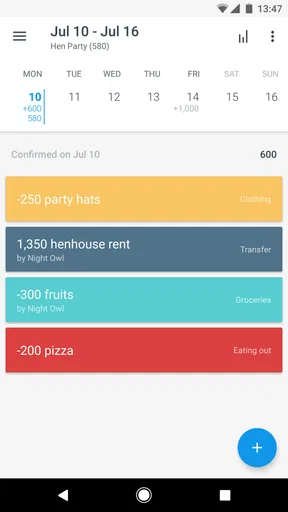
Our Review of Dollarbird Pro
 Analysis by Appyee
I like finance apps that make me look at my money before it disappears, rather than apps that bury everyday spending under endless charts. Dollarbird Pro takes that simpler route. It is a personal finance calendar from Dollarbird Apps SRL, built around the idea that a date-based view can make upcoming bills, income, and spending easier to understand. After using it, I found the calendar approach more natural than a traditional list for planning, although it also demands a little discipline from the person entering the information.
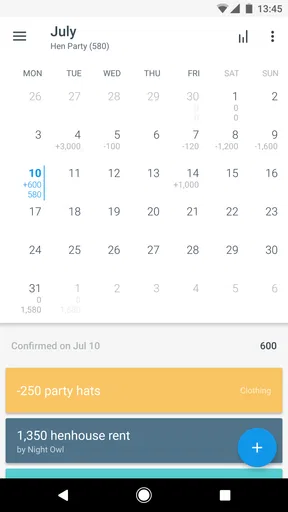
The app is free to install and suitable for Everyone, with optional in-app purchases ranging from $7.99 to $79.99 per item. Its current version is 6.2.2, and it runs on Android 6.0 or later. The store presents it as Dollarbird Pro and describes it as personal finance calendar with a spark of AI. That AI angle is not the reason I would choose it, though. The practical appeal is the visual timeline: I can see what happened, what is expected, and where a busy month may become uncomfortable.
How the calendar changes a normal budgeting routine
My baseline workflow with Dollarbird Pro is straightforward. I enter income when it arrives, add recurring obligations on the dates I expect them, and record day-to-day purchases close to the moment they happen. The calendar then becomes less like a diary and more like a forward-looking cash map. That distinction matters because a budget can look healthy in total while still leaving a difficult gap between two paydays.
For example, imagine that rent is due early in the month, a utility bill follows a few days later, and a salary arrives later than usual. A category-based budget may tell me that the month is affordable overall. The calendar view makes the timing problem visible. I can inspect the stretch between those dates and decide whether a planned purchase should wait. That is one of the strongest reasons to use this app instead of relying only on a bank balance.
I would not treat the calendar as an automatic mirror of my bank account. The useful results depend on what I record. If I forget small purchases, the future balance becomes too optimistic. If I enter a bill on the wrong day, the visual warning arrives at the wrong time. I found that the best habit is a short evening check: record the day’s spending, glance at the next few obligations, and correct anything that no longer matches reality.
That routine is especially useful for people paid on a fixed schedule, freelancers who need to plan around irregular income, and households that want a shared view of upcoming commitments. It is less appealing if I want every transaction imported automatically or expect the app to build a complete financial picture without manual attention. Dollarbird Pro rewards active planning rather than passive monitoring.
Start with a clean month, not a perfect financial history
One mistake I would avoid is trying to reconstruct every purchase from the past before using the app properly. That creates a large setup task and can make the calendar feel like bookkeeping homework. I get more value by entering the current balance, known income, and major upcoming bills first. Once the forward view is useful, I can add detail gradually.
This approach also makes it easier to test whether the calendar suits me. After a week or two, I can tell whether I naturally remember to enter purchases and whether seeing transactions by date improves decisions. If it does not, adding more historical detail will not solve the underlying mismatch. The app is at its best when the calendar becomes part of a repeatable routine.
I also prefer entering a purchase in the category that will help me make a future decision. A broad food entry may be enough if my concern is the total weekly spend. More precise entries are worthwhile when I am trying to control a particular habit. The point is not to create accounting records for their own sake; it is to make the calendar answer a question I actually have.
Use the future view before committing to a purchase
The most valuable moment to open this app is often before spending, not after. If I am considering a larger purchase, I can look beyond today and check whether several fixed obligations are approaching. This is a small change in behavior, but it turns the calendar into a decision tool rather than a place where I explain past mistakes.
I found it helpful to check the same future window each time, such as the period until the next income date. Consistency makes changes easier to notice. A single low balance may not be alarming, but repeated tight periods reveal a pattern: perhaps several subscriptions cluster together, or a bill is consistently arriving before income. Dollarbird Pro cannot fix that timing by itself, but it can make the pattern hard to ignore.
Settings, shortcuts, and habits that make it easier to maintain
The settings worth checking are the ones that reduce friction in the way I already manage money. I would first confirm the app’s basic date, currency, and notification behavior as I set up the calendar, then decide how much detail I really want in categories. The exact ideal arrangement depends on my finances, but the principle is consistent: every setting should help me enter information faster or interpret the calendar more clearly.
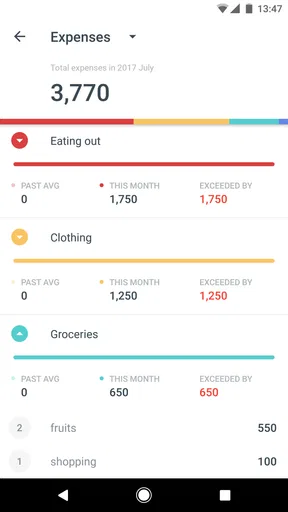
Categories deserve more thought than I initially gave them. Too few categories hide useful distinctions, while too many turn every entry into a decision. I prefer a compact structure built around recurring obligations, everyday essentials, flexible spending, and income. If I am tracking a temporary goal, I can make that goal visible without redesigning the entire system. This keeps the calendar readable on a phone screen.
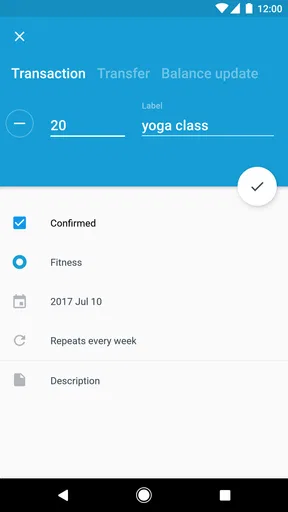
Recurring transactions are where the app can save the most effort, provided I review them. I would use repeat entries for obligations that genuinely follow a stable pattern, then revisit them when an amount or date changes. The important trade-off is convenience versus accuracy. A recurring bill entered once and forgotten can quietly distort the forecast. I treat repeated entries as reminders to verify, not as permission to stop checking.
Notifications, where I choose to use them, should support a habit rather than become background noise. A reminder to review the calendar before a busy payment period is more useful to me than constant prompts for every small action. If reminders start feeling intrusive, I would reduce them and keep a fixed manual review instead. The system has to be sustainable; an elaborate routine that I abandon is worse than a modest routine I keep.
A practical weekly review
My preferred weekly review has three passes. First, I check whether the previous days contain all the important spending. Second, I scan the next several dates for bills and expected income. Third, I compare the forecast with what I know has changed: a delayed payment, an unusual purchase, or a bill that came in at a different amount.
This is also the right time to clean up mistakes. A duplicate entry can make an entire week look worse than it is, while a missing purchase can create false confidence. I would rather spend a few minutes correcting the calendar than make a decision based on a number that only appears precise. The visual format is helpful, but it can also make inaccurate entries look convincing.
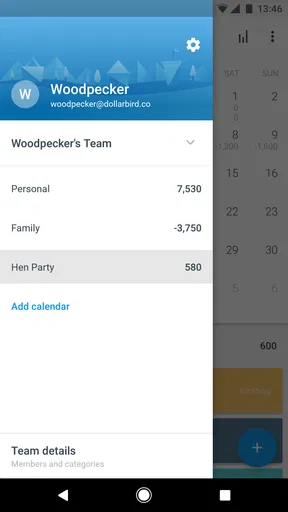
For couples or families, the calendar can support a shared conversation about timing, even if each person has a different spending style. One useful arrangement is to record household commitments consistently while keeping personal discretionary purchases at the level each person can maintain. The app is not a substitute for agreeing on categories or responsibilities, but a shared date view can make discussions more concrete than vague statements about “spending too much.”
Faster entry patterns without pretending the app is automatic
Experienced use is mostly about removing repeated decisions. I would enter common transactions with consistent names and categories, keep recurring commitments clearly recognizable, and record purchases in batches only when I am confident I will remember them. A quick entry made immediately is usually safer than relying on a weekend memory session, especially for small card payments.
Batching can still work for predictable situations. After a grocery trip, for instance, I can enter the total right away and avoid splitting it into artificial detail unless that detail affects a decision. For a trip or event, grouping related spending under a clear category may make the calendar easier to read. The trade-off is that simpler entries are faster but less useful for analyzing specific habits later.
I also recommend separating planned spending from surprise spending in the way I label or categorize it. That lets me look back and ask a better question: did the month go wrong because the plan was unrealistic, or because several unplanned costs appeared? Without that distinction, every overrun looks the same. The calendar is much more useful when entries preserve the reason behind the change.
The AI reference in the store summary may attract people looking for automated financial advice. I would keep expectations practical. The part I can rely on day after day is the calendar workflow and the information I maintain. I would not hand over important financial decisions to an automated suggestion without checking the underlying entries and considering my own circumstances.
Where the app feels less comfortable
The main friction is manual maintenance. People who want bank synchronization, automatic categorization, detailed investment tracking, or highly specialized debt tools may find a conventional finance dashboard more suitable. Dollarbird Pro’s strength is the timing of personal cash flow, not an all-in-one financial command center.
The rating sits at an average of 3.3 from around 592 ratings, with roughly 128 written reviews, and that mixed reception is worth keeping in mind. I would not read it as proof that the app is poor, but it does suggest that the calendar model will not suit everyone. Some users want immediate automation; others are happy to enter transactions themselves because that act keeps them aware of spending.
There is also a psychological limitation. A calendar full of future bills can feel stressful, especially when income is uncertain. That discomfort is not necessarily a flaw; sometimes it is the information I need. Still, users who prefer a very calm, minimal overview may find the detailed date view demanding. The app asks me to engage with financial timing instead of reducing everything to one reassuring total.
Who should choose it, and who should look elsewhere
I would recommend Dollarbird Pro to someone who repeatedly asks, “Will I have enough available when this payment arrives?” It is a strong fit for planning around paydays, managing recurring household costs, handling irregular freelance income, or building awareness of how small purchases affect the rest of the month.
I would be more cautious recommending it to someone who never wants to enter transactions manually. If automatic imports are essential, a bank-connected budgeting service is likely a better starting point. Likewise, a person focused on investments, taxes, detailed net-worth reporting, or formal business accounting should use a specialist tool. The calendar can complement those systems, but it does not replace them.
Storage is another practical consideration. The app has passed 50K+ installs, which shows that it has found a real audience, but it is not positioned as the universal default for every budgeting style. I see that as a reason to test the workflow honestly rather than assume popularity guarantees a fit. Since the app is free to install, I can evaluate the basic habit before deciding whether optional purchases are worthwhile.
My verdict after using the full workflow
Dollarbird Pro succeeds when I use it as a forward-looking calendar, not merely as a record of yesterday’s spending. Its best insight is simple: the date of a transaction can matter as much as its category or amount. Seeing a crowded payment period helps me delay purchases, reserve money earlier, and recognize recurring timing problems before they become emergencies.
The app is not effortless, and that is the central trade-off. I have to enter information accurately, review repeated items, and accept that a forecast is only as good as the habits behind it. In exchange, I get a clearer sense of how money moves through the month. For me, that is more actionable than a collection of polished charts that I rarely consult.
I would start with a small, repeatable setup: current balance, income dates, major obligations, and only the categories I will actually maintain. Then I would use the calendar before larger purchases and perform a short weekly correction pass. If that rhythm feels useful, the app has earned a place in my routine. If I keep forgetting to update it or need automatic account aggregation, I would move to a different finance app without hesitation.
My honest recommendation is conditional but positive: choose Dollarbird Pro if you want a hands-on personal finance calendar and are willing to keep it current. Its free entry point makes experimentation easy, its Everyone rating makes it broadly approachable, and its latest version keeps the experience current for supported Android devices. Just do not mistake a tidy calendar for an automatic budget. The real benefit appears when I use it consistently to make decisions before money leaves my account.
Verdict
Strengths of Dollarbird Pro
- Tracks shared finances with collaborative calendar entries.
- Recurring transactions reduce repetitive manual logging.
- Color-coded categories make spending patterns easy to scan.
- Supports planning future balances before bills are due.
- Useful for households managing expenses across multiple people.
Limitations of Dollarbird Pro
- Requires consistent manual entry for accurate financial records.
- No automatic bank synchronization may limit convenience.
- Exchange-rate handling can be inconvenient for frequent travelers.
- Shared access may expose sensitive financial details to collaborators.
- Advanced budgeting features may feel limited for power users.
Similar Picks in This Category
View All
Google Wallet
Google LLC4.3

Airtel: Recharge, Bank & Loans
Airtel4.0

PayPal - Pay, Send, Save
PayPal Mobile4.2

DANA Indonesia Digital Wallet
PT Espay Debit Indonesia Koe4.5

Binance: Buy Bitcoin & Crypto
Binance Inc.4.8

Cash App
Block, Inc.4.7
Frequently Asked Questions
What is Dollarbird Pro and what is it used for?
Dollarbird Pro is a personal finance and budgeting app designed to help you track income, expenses, bills, and upcoming transactions in a calendar-based view. Instead of only showing past spending, it helps you see how planned payments may affect your future balance. It can be useful for individuals, couples, or anyone who prefers managing money by dates rather than traditional category-only budgets.
Does Dollarbird Pro connect directly to my bank account?
Dollarbird Pro is primarily built around manually entering and organizing financial transactions, so users should not assume that their bank accounts, credit cards, or payment services will automatically synchronize. This approach gives you more control and may provide additional privacy, but it also means that accurate results depend on regularly recording purchases, income, transfers, and recurring bills yourself.
Is Dollarbird Pro suitable for managing shared household finances?
Dollarbird Pro can be useful for household budgeting because its calendar format makes recurring bills, expected income, and planned expenses easy to review together. However, the exact collaboration and synchronization features may depend on the current version and subscription plan. Before downloading, check whether the app supports the number of users, devices, shared calendars, and account permissions your household requires.
Does Dollarbird Pro require a subscription or include in-app purchases?
Dollarbird Pro may be offered as a paid version, subscription, or upgrade depending on the platform, region, and current developer pricing. Some features may be unavailable in the free edition, while others could require an ongoing payment. Review the App Store or Google Play listing carefully for trial terms, renewal conditions, and included features before confirming a purchase or starting a subscription.
Is Dollarbird Pro safe for storing personal financial information?
Dollarbird Pro may contain sensitive information such as income details, spending records, bills, and financial plans, even when it does not connect directly to a bank. Use a strong device passcode and review the app’s privacy policy to understand how data is stored, synchronized, and shared. Avoid entering unnecessary account credentials, and download only the official version from a trusted app store.
